SpecGens.ai · Technical Role Agents

Two types of agents, one hardware team.

SpecGens.ai is Seagull Work’s hardware-design system for cameras and power supplies. You approve a written specification; the Architect, Design, and Layout agents produce the system architecture, schematic, board layout and fabrication files. An experienced engineer in the relevant domain reviews your design package. You receive manufacturer-sourced component data and a compliance matrix that traces your design to your requirements. Procurement builds and updates the component database used by Architect, Design, and Layout.

Two types of agents

Air-gapped design. Internet-connected procurement.

Your Architect, Design, and Layout agents handle engineering using the component database created by Procurement. You use the two agent types for different roles, with different connectivity.

Air-gapped

Architect · Design · Layout

Run inside your facility or ours, without an internet connection. These three agents use the component database created by Procurement to turn your approved specification into architecture, schematics, board layout and fabrication files.

See the design workflow →

Internet-connected

Procurement

Builds and updates the component database using manufacturer documentation, distributor catalogs and supplier APIs. Procurement is internet-connected, not air-gapped; it also checks supply, prices BOMs and prepares purchasing.

Explore Procurement →
Air-gapped · Architect, Design, Layout

Three design agents, one coordinated workflow.

Your Architect and Design agents produce the inputs for Layout, which handles your board placement, routing and fabrication files.

Input

Approved spec

Your requirements, frozen and signed off

01

Architect

System architecture: sensor or converter topology, interfaces, power tree

→ architecture, constraints
02

Design

Schematic under domain design rules and reference designs

→ schematic, netlist
03

Layout

Placement and routing against stackup and high-speed constraints

→ board, fab files
Output

Design package

Engineer-reviewed, using manufacturer-sourced component data, with a compliance matrix

Patent pendingAgent coordination layer

Your agents share one design context: your requirements, constraints, part data and design changes. When one agent changes a decision, the others are informed and adjust, so a part substitution or a layout constraint does not silently break an earlier stage of your design.

Procurement builds the database that all three design agents use.
Internet-connected

Procurement

Manufacturer documentation
Distributor and supplier data

Used inside the air-gapped design environment

Component database

Technical records
Component and sourcing knowledge

ArchitectUses the database for system architecture
DesignUses the database for schematic design
LayoutUses the database for placement and routing

The arrows show the flow of component knowledge. Architect, Design, and Layout use the database within their air-gapped environment.

Design outputs

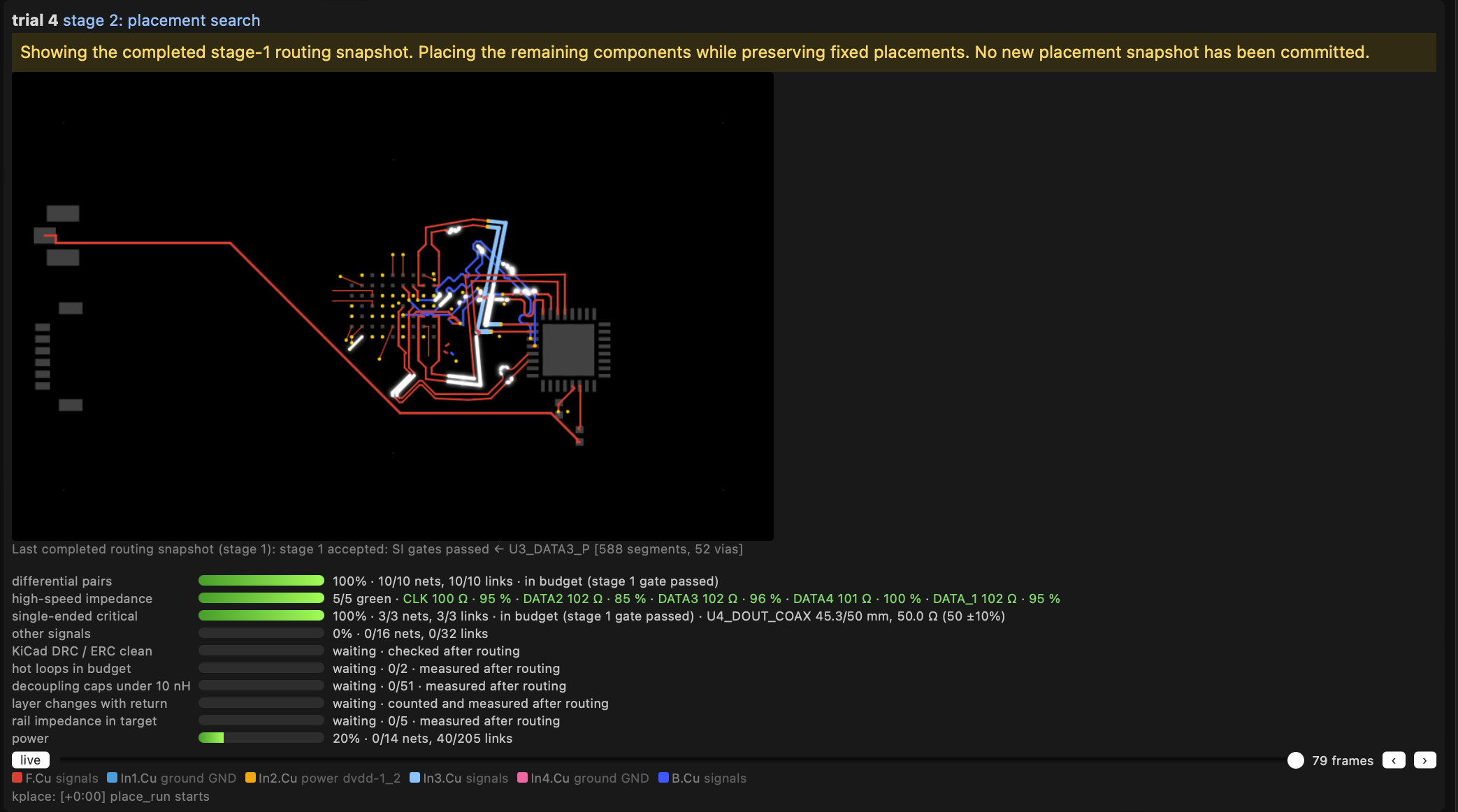
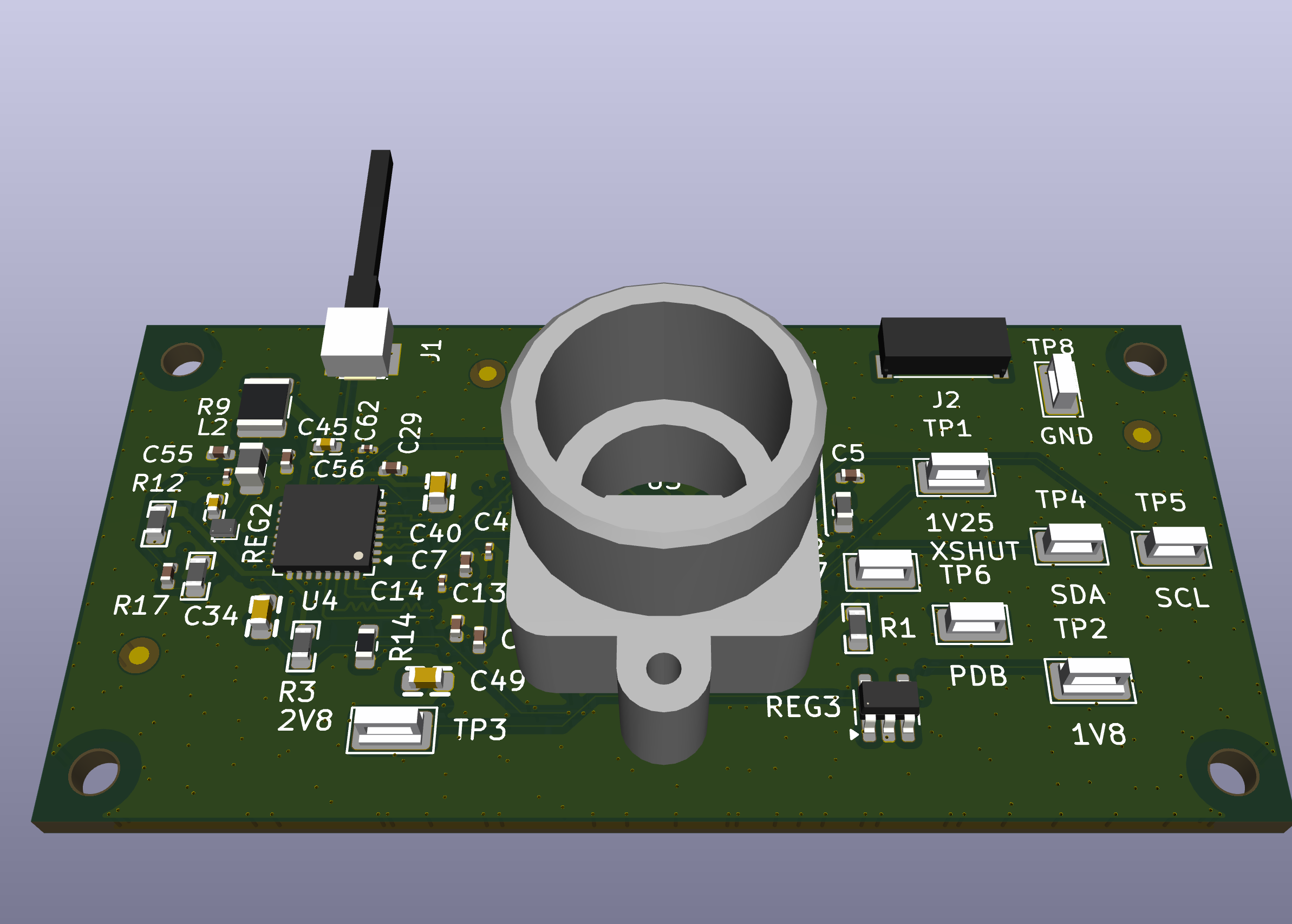
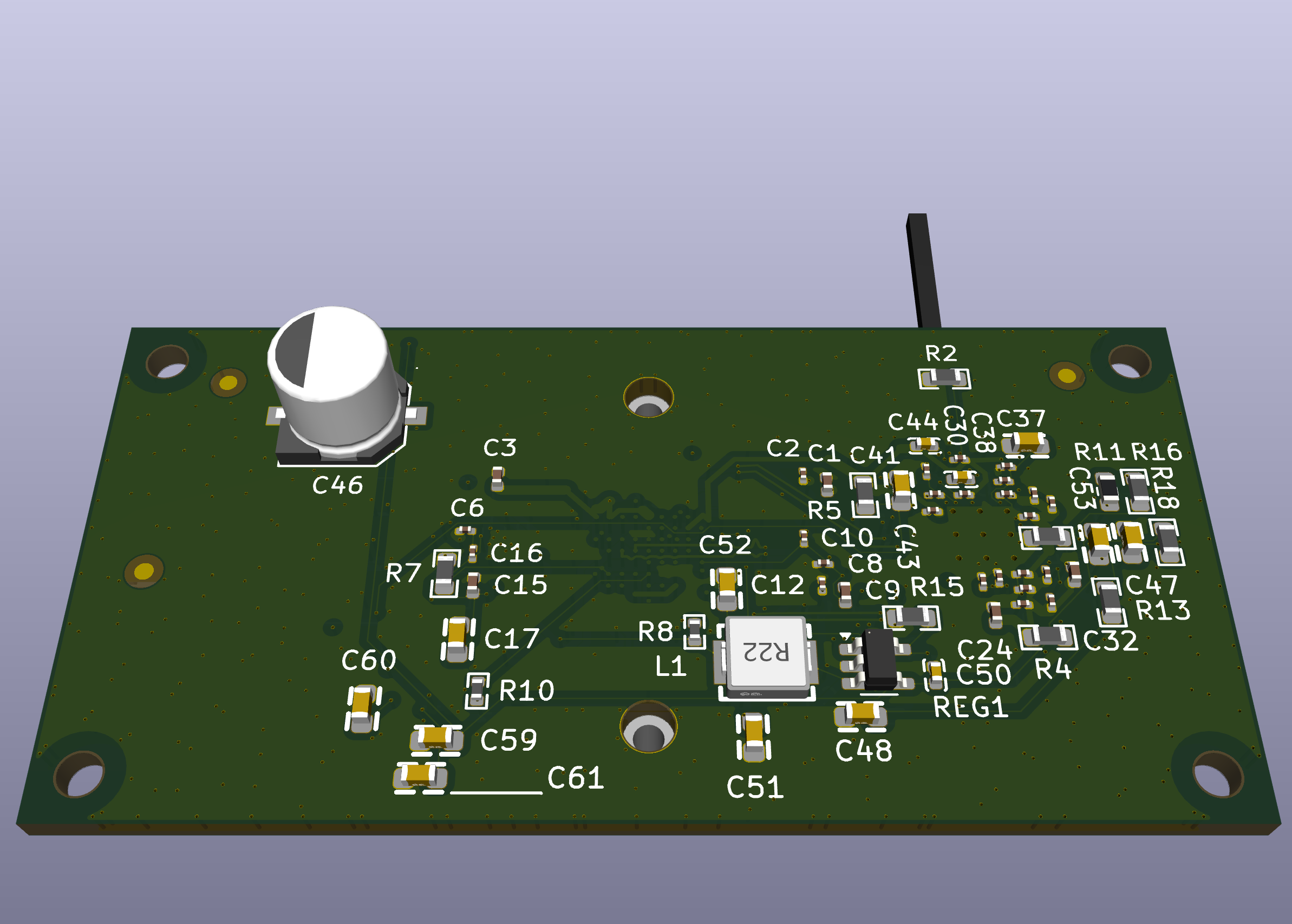
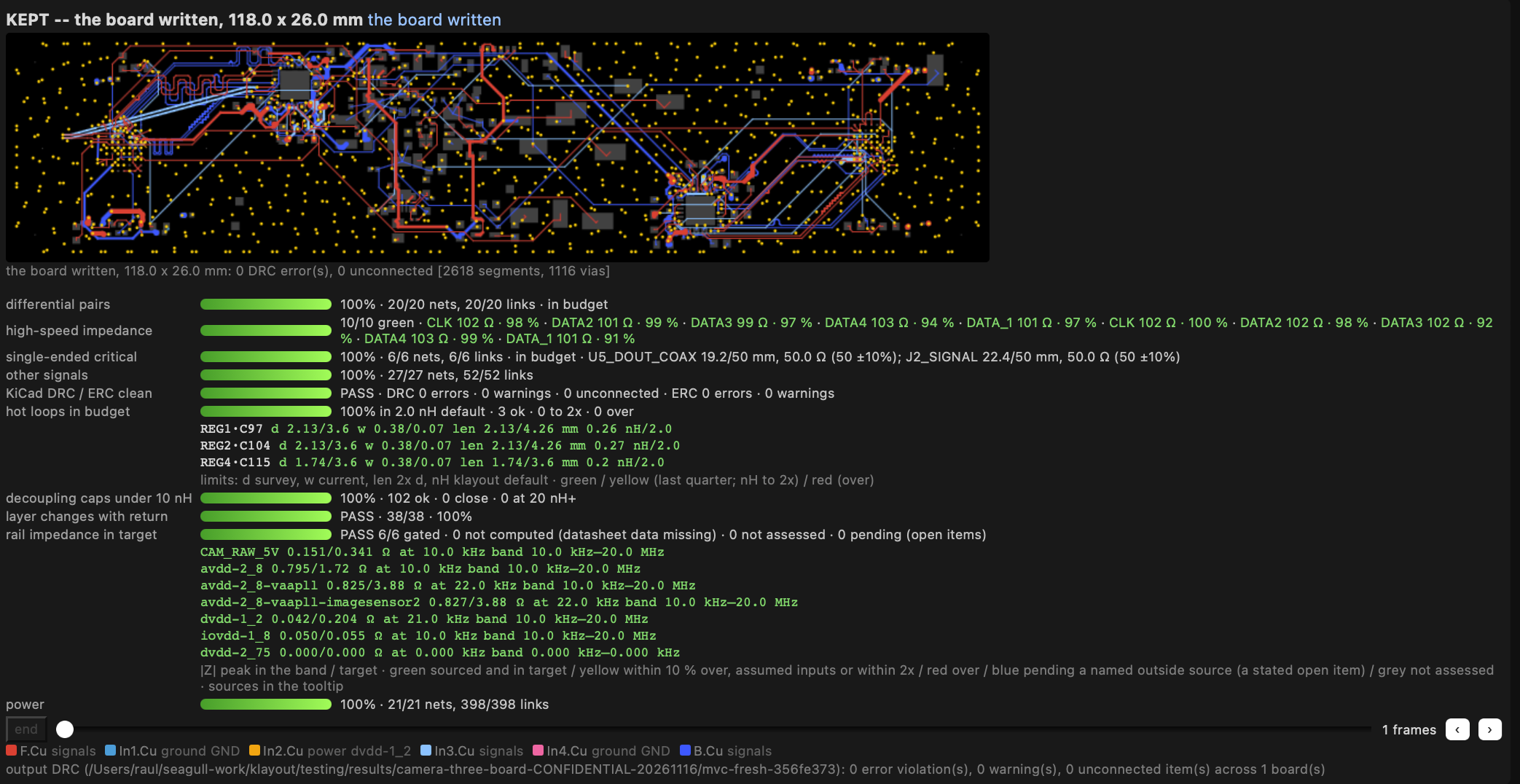
Layout in practice. Boards you can inspect.

Explore examples from different camera designs: a routed board and its reported checks, an intermediate layout stage, and 3D board previews from the full design process.

These examples are separate from the illustrative 1080p60 specification below. Reported design checks and CAD previews precede manufactured-board validation.

You sign off on the spec. We document the evidence.

You can judge whether a specification describes the camera or power supply you need. Your approved spec becomes the acceptance test, and your compliance matrix shows the evidence for each requirement.

Expert-reviewed today. Autonomous by design.

An experienced engineer in the relevant domain reviews your design, while we measure how much of the work your agents complete on their own.

Internet-connected · Procurement

From a part requirement to a sourceable BOM.

The Procurement agent creates and maintains the component database used by Architect, Design, and Layout. It connects to online manufacturer and distributor sources for technical records, costing and build preparation. The three design agents use that database in their air-gapped environment; Procurement itself is not air-gapped.

Find candidate parts

Search by manufacturer part number or describe the component you need. Discover candidate parts and retrieve their manufacturer and distributor records for review.

Build component knowledge

Retrieve datasheets and application notes, extract pin and operating data into structured component records, and collect footprints and 3D models where available. Component classification and validation checks support review before records enter the component database used by Architect, Design, and Layout.

Check supply and lifecycle

Refresh distributor stock, lead times and manufacturer lifecycle status. Keep check dates and source evidence, with missing or uncertain information visible.

Price the build

Scale a BOM to your build quantity, combine repeated part numbers and compare DigiKey, Mouser and Newark offers. Account for available stock, quantity price breaks and order terms; identify shortages and parts without an offer.

Review quotes and prepare carts

Import supplier quotes from spreadsheets or PDFs and retain their prices, validity and terms separately from public list pricing. Prepare distributor cart files, or create supported account carts and lists when configured. You complete checkout and payment with the distributor.

Prepare for fabrication and assembly

Collect published PCB fabrication rules and stackups. Prepare assembly purchasing quantities with passive spares, check packaging where supplier data supports it, and retain the input BOM and sourcing summary for review.

Your supplier coverage depends on configured accounts, API access and available documentation. You can distinguish cached sourcing records from live responses and see missing prices or insufficient stock.

What we can promise

Clear about what is proven before fabrication.

You see how each of your requirements can be confirmed before you approve the spec.

Verified

Checked deterministically

  • Connectivity and design rules
  • Component fit and footprints
  • Power budget
  • Dated BOM pricing, stock and lifecycle records
Simulated

Assessed with electrical models

  • Impedance, reflections, timing and eye openings on supported high-speed links
  • Crosstalk and loss where field-solver channel data is available
  • DC voltage drop on modeled power rails
  • Power-distribution impedance and decoupling
  • Switching ripple, capacitor currents, overshoot and ringing
Hardware test

Disclosed and planned

  • EMC compliance
  • Thermal performance, including sensor and power-component temperatures
  • Optical alignment
  • Power-supply load-step response and regulation
  • Efficiency across load and input ranges
  • First-article inspection

Your analysis coverage depends on supported interfaces, your routed board and available component data. Your reports identify assumptions and missing inputs. You still need hardware validation alongside simulation. Your supplier checks describe the information available on the check date; current lifecycle status does not guarantee future availability.

Your options

How SpecGens.ai compares.

Hire an engineerDesign consultancyCloud AI design toolsSpecGens.ai
Who does the engineeringYour hireTheir teamYour engineers, assistedAgents trained by experienced engineers
Domain knowledgeOne person’s experienceVaries by firmGeneral-purpose modelsCamera and power-supply engineers’ expertise
What you approveTheir judgmentA layoutEach step, as you goA plain-language specification
Evidence it meets your requirementsInformalVaries by firmDesign-rule checksCompliance matrix, line by line
Where your design data livesYour systemsThe consultancy’s systemsUsually the vendor’s cloudDesign workspace: air-gapped, yours or ours. Component database: built by Procurement.
CommitmentFull-time headcountProject feePer-seat subscriptionSubscription for agent updates, or a fixed price per device
Use case example · Camera

A TI FPD-Link III HD camera, traced to its spec.

See how your requirements would be traced in a SpecGens.ai compliance matrix. This example is illustrative, rather than a completed customer design.

camera.spec, design targetIllustrative
sensor     : 1920 × 1080 global shutter
interface  : FPD-Link III, 4.16 Gbps
serializer : TI DS90UB953-Q1
receiver   : TI DS90UB954-Q1
frame_rate : 60 fps
format     : CSI-2 RAW10, packed
payload    : 155.52 MB/s (1.24416 Gbps)
lens       : C-mount
power      : Power over coax, < 4.5 W
size       : 29 × 29 mm
bom_cost   : < $85 at 5k units
lifecycle  : 7+ years
1920 × 1080 global shutterConfirm against the selected sensor datasheetTo verify
FPD-Link III, 4.16 GbpsPlanned routing and impedance analysis; cable test requiredTo analyze
1080p60 RAW10 image payload155.52 MB/s; calculation belowCalculated
Under 4.5 W, power over coaxPlanned power budget, rail analysis and hardware measurementTarget
Camera-module BOM under $85 at 5k unitsRequires a selected and priced BOM; receiver and cable excludedTarget
7+ year availability targetRequires supplier commitments and lifecycle planningTarget
EMC and lens alignmentPlanned with your manufacturerHardware test

Verified, Simulated and Hardware test describe the evidence method. Neutral labels (To verify, To analyze and Target) mean the work is pending. Calculated identifies completed arithmetic only. Only the bandwidth arithmetic is calculated here. Sensor selection, analysis, costing and lifecycle planning remain to be completed. Hardware tests must confirm sustained frame rate, cable performance, power, EMC and optical alignment.

1080p60 RAW10 bandwidth calculation

Full HD is 1920 × 1080 = 2,073,600 active pixels per frame. With packed 10-bit RAW10, four pixels occupy five bytes.

1920 × 1080 × 10 bits × 60 fps = 1,244,160,000 bits/s = 1.24416 Gbps (about 1.2 Gbps).

Divide by 8 for bytes: 155,520,000 bytes/s = 155.52 MB/s. These are decimal units and image payload only.

Assuming one CSI-2 long packet per image row, a 6-byte header/footer per row and two 4-byte frame-boundary packets: (2,592,000 + 1080 × 6 + 8) × 60 = 155.90928 MB/s, or 1.24727424 Gbps. Optional packets, embedded data and D-PHY transition time need a separate allowance.

TI FPD-Link III link budget

The signal path is sensor → MIPI CSI-2 RAW10 → DS90UB953-Q1 serializer → coax → DS90UB954-Q1 deserializer → host CSI-2 input. The camera is powered over coax; the receiver and cable are outside the camera-module BOM target.

TI specifies a 4.16 Gbps forward link for the serializer. This is the serial line rate, including FPD-Link transport overhead. It is distinct from the 1.24416 Gbps image payload.

With 20% planning headroom, the image-payload budget is 1.492992 Gbps (186.624 MB/s). A candidate CSI-2 configuration is two data lanes at 800 Mbps each, totaling 1.6 Gbps. Confirm sensor burst timing, packet overhead, link configuration and receiver output capacity before claiming 60 fps.

Technical references: TI DS90UB953-Q1 serializer and CSI-2 packet structure and TI DS90UB954-Q1 deserializer. This is an illustrative design target, not a tested camera. The 20% margin is a planning allowance, not an exact overhead calculation; cable performance, power over coax and sustained frame rate require hardware validation.

Start here

Your next design starts with a specification.

Tell us about the camera or power supply your team needs to design. We can scope a project or agent deployment around your requirements.

Email hello@cgull.work. We reply personally to every inquiry.